How Churches Can Use AI for Communications Without Losing the Human Touch
A church invitation feels different when you can see the people who will greet you at the door. That is the standard I come back to when deciding what AI should help with.
A personal note from Allen Michael
I personally don’t like the look of generic AI-generated church ads. When the faces and setting could belong to any organization, the invitation can feel less trustworthy. I’d rather see the people who actually serve, sing and welcome visitors at your church. Use AI to help draft or organize the work, and let real people carry the story.
Give the prompt the details a person would need
Try this: “Write a warm, 60-word invitation for neighbors who have never visited. Use only the confirmed event details below. Include the time, address and one next step. Flag anything missing. Suggest a crop using our approved volunteer photo.” Review the result for accuracy and for the way your church actually speaks.
Frame the same story for each screen
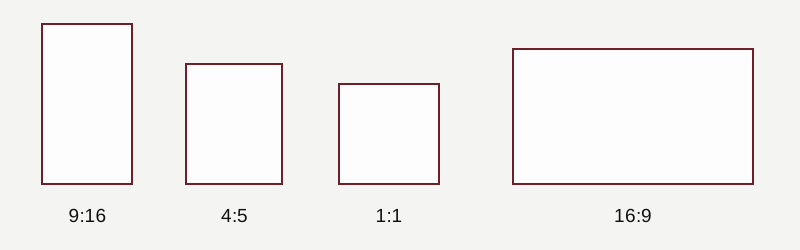
Use 9:16 for vertical Reels and Stories, 4:5 or 1:1 for many feed graphics, and 16:9 for widescreen projectors and TVs. Facebook and Instagram each have several placements, so preview the exact placement. Reposition faces and type for each crop.
Start with an approved event record
Give the tool the confirmed title, audience, date, time, location and registration link. Ask for a newsletter blurb, a caption and a bulletin line. Instruct it to list missing fields separately and leave those details out of the drafts.
Build a review step into the workflow
Have the ministry owner verify facts and tone. Compare drafts against the original record, especially dates, names and quotations. Route revisions only to the channels affected, then ask the reviewer to approve the updated material.
Use it for sorting and repurposing
Group staff submissions by deadline, propose a calendar, or identify possible clips from a sermon transcript. Check every clip against the full recording. Sort only approved photos and have a person confirm permission before publication.
Keep pastoral decisions with people
Use public or approved material in the drafting tool. Keep prayer requests, counseling notes, member lists and identifiable information about children out of routine prompts. Have leadership set the boundaries for theology, personal stories and pastoral correspondence.
Frequently asked question
Where should we start?
Try one low-risk task for four weeks, such as turning confirmed event details into a short email blurb. Compare editing time and correction rates against your manual process.